> ## Documentation Index
> Fetch the complete documentation index at: https://nango-marcin-get-deployments-docs.mintlify.site/llms.txt
> Use this file to discover all available pages before exploring further.
# Zapier SCIM - How do I link my account?
# Overview
To authenticate with Zapier SCIM, you need one key piece of information:
1. **API Token** - A token generated from your Zapier enterprise account settings to authenticate SCIM requests.
This guide will walk you through the steps to generate and use this token to connect your Zapier account.
***
### Prerequisites:
* You must have an **Enterprise** Zapier account.
***
## Getting Your SCIM API Token
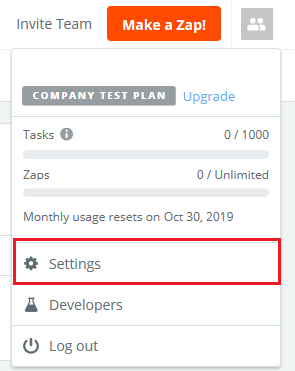
1. Log in to your [Zapier Admin Console](https://zapier.com/app/login/) and navigate to **Settings**.
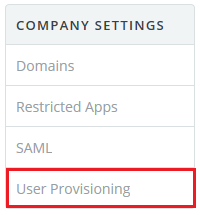
 2. Under COMPANY SETTINGS, select **User provisioning**.
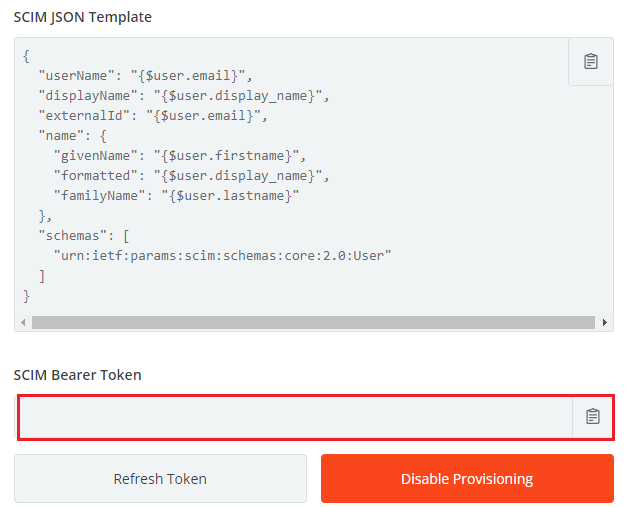
 3. Copy the **SCIM Bearer Token**.
 **Important**: Store your API token securely, as it will be required to connect your Zapier account.
***
## Additional Notes
* Once connected, you can use SCIM to:
* Create and update users.
* Assign or update user roles.
* Deactivate users.
* Make sure the users are associated with a verified domain for your organization.
* For detailed SCIM integration steps refer to the [Zapier Help Center](https://help.zapier.com/hc/en-us/articles/8496291497741-Provision-user-accounts-with-SCIM#h_01HE8NPZMWPKE66CN8R0AFQ0AR).
***
**Keep your SCIM API token confidential and do not share it publicly. If the token is compromised, generate a new one immediately.**
**Important**: Store your API token securely, as it will be required to connect your Zapier account.
***
## Additional Notes
* Once connected, you can use SCIM to:
* Create and update users.
* Assign or update user roles.
* Deactivate users.
* Make sure the users are associated with a verified domain for your organization.
* For detailed SCIM integration steps refer to the [Zapier Help Center](https://help.zapier.com/hc/en-us/articles/8496291497741-Provision-user-accounts-with-SCIM#h_01HE8NPZMWPKE66CN8R0AFQ0AR).
***
**Keep your SCIM API token confidential and do not share it publicly. If the token is compromised, generate a new one immediately.**