> ## Documentation Index
> Fetch the complete documentation index at: https://nango-marcin-get-deployments-docs.mintlify.site/llms.txt
> Use this file to discover all available pages before exploring further.
# OpenAI Administration - How to Connect Your Account
# Overview
To connect your **OpenAI Administration** account, you need to authenticate using an **Admin Key**.
This key allows you to access OpenAI's Administration APIs for programmatic administration of your account, and more.
**Note**
Admin keys cannot be used for non-administration endpoints.
This guide will help you retrieve your Admin key and set up the connection.
***
### Prerequisites
* An **OpenAI account** with an active subscription or free-tier access.
* An Admin key generated from your OpenAI account settings.
***
### Step 1: Retrieve Your OpenAI Admin Key
1. Log in to your [OpenAI account](https://platform.openai.com/signup/).
2. Navigate to the **Admin Keys** section under **Settings**.
3. Click **Create new Admin key** to generate a new Admin key.
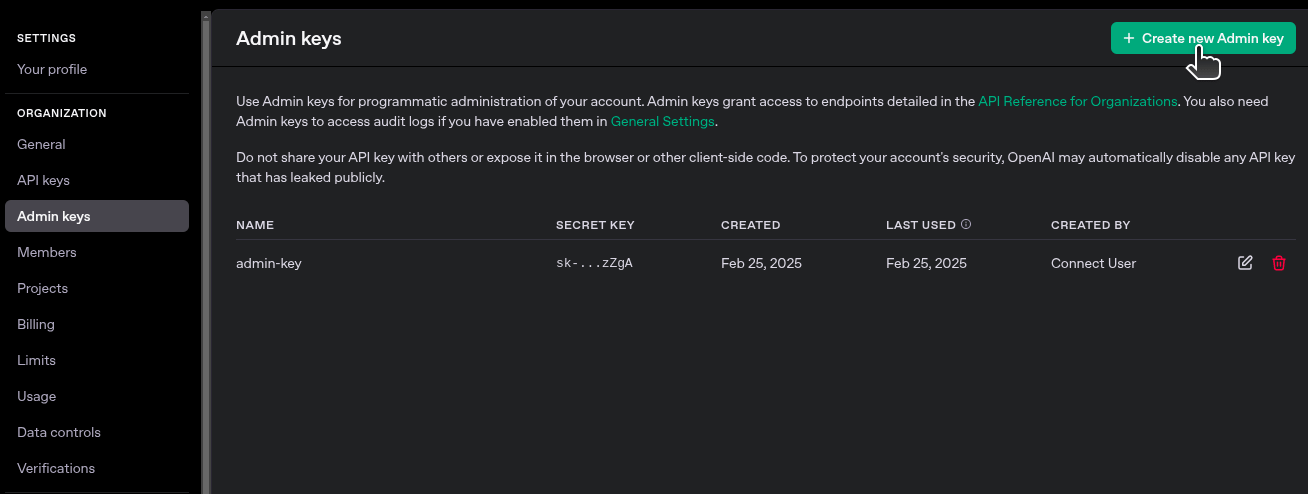 4. Copy the key and save it in a secure location. For security reasons, OpenAI will not show the key again after this step.
***
### Step 2: Connect Your OpenAI Account
To authenticate with OpenAI, you need to provide your Admin key. Follow these steps to connect:
1. Go to the OpenAI connection form in the integration setup.
2. Enter your Admin key in the **Admin Key** field.
4. Copy the key and save it in a secure location. For security reasons, OpenAI will not show the key again after this step.
***
### Step 2: Connect Your OpenAI Account
To authenticate with OpenAI, you need to provide your Admin key. Follow these steps to connect:
1. Go to the OpenAI connection form in the integration setup.
2. Enter your Admin key in the **Admin Key** field.
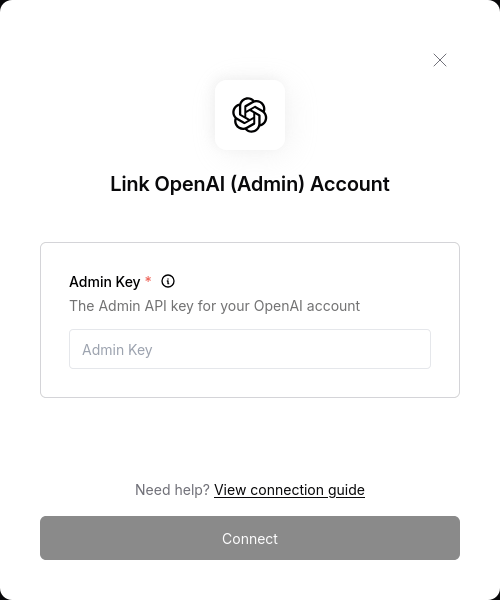 3. Submit the form to complete the connection.
***
3. Submit the form to complete the connection.
***