

Overview
To authenticate with the Agentcard API, you need:- Client ID - The OAuth client ID for your Agentcard organization
- Client Secret - The OAuth client secret paired with that ID
https://api.agentcard.sh.
Prerequisites
- An Agentcard account with an organization (sign up)
Instructions
Step 1: Open the Credentials page
- Sign in to the Agentcard dashboard.
- Select your organization.
- Go to Settings -> Developers -> Credentials.
Step 2: Copy your Client ID and Client Secret
- Your Client ID is shown on the Credentials page.
- Reveal and copy the secret for the environment you want: sandbox to test without moving money, or production for live cards (production requires an active subscription). Secrets start with
acs_.
Prefer the terminal? Install the CLI with
npm i -g agent-cards, then run agent-cards companies login and agent-cards companies credentials create. It prints a Client ID and Client Secret; the secret is shown once.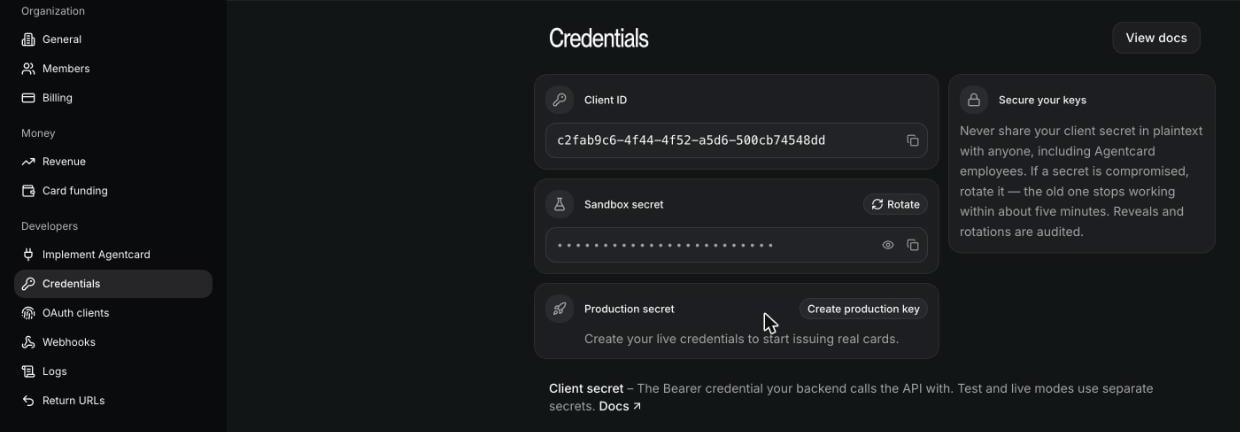
Step 3: Enter credentials in the Connect UI
- Open the form where you need to authenticate with Agentcard.
- Enter your Client ID and Client Secret in their respective fields.
- Submit the form, and you should be successfully authenticated.